You've reached the moment most SMB owners get stuck.
You opened Cowork. You watched it work on a folder. You understand the paradigm. You know skills exist and you've seen what scheduling and Dispatch can do. And now you're staring at the empty workspace thinking: where do I start?
This is the cold-start problem. Cowork doesn't know your business. It doesn't know how you talk to clients. It doesn't know which projects you'd never take, or what your pricing logic actually is, or what your last five customers had in common. Every conversation has to re-establish that context from scratch — which is the situation Module 1 told you Cowork would help you escape.
Anthropic's own SMB curriculum recommends fixing this by building a "context document" or "AI briefing sheet" for your business in a Claude conversation — in Anthropic's words, "a reusable context document that makes every future AI interaction more productive."
This module gives you the automated, Cowork-native version: the Business Onboarder Skill. You install it once. You run it once. It interviews you for about 90 minutes — across six phases — and produces a publishable 9-file workspace that every future Cowork conversation in your business can inherit from.
What it actually does
The Business Onboarder is a custom skill, built by Aivant, that you load into Cowork the same way you'd load any other skill.
When you invoke it, Claude doesn't lecture you about your business — it asks you about it. The interview is grounded in seven published frameworks: Jobs-to-Be-Done (Christensen, Ulwick), the Strategyzer Value Proposition Canvas (Osterwalder, Pigneur), April Dunford's positioning, Donald Miller's StoryBrand BrandScript, Madhavan Ramanujam's pricing thinking, and Rob Fitzpatrick's Mom Test interviewing discipline. You don't have to know any of these. The skill carries the framework so you don't have to.
What you experience is 90 minutes of plain-English questions — "walk me through your last five customers, one at a time," "if your business literally didn't exist tomorrow, what would your customers do instead?" — answered in your own words. The skill quotes your words back at you, doesn't translate them into jargon, and marks anywhere you couldn't give a confident answer as [thin evidence: needs X] so you can fill it in later.
At the end, Claude synthesizes everything you said into nine files:
your-business/
├── CLAUDE.md
├── progress.md
└── core/
 ├── persona.md
 ├── positioning.md
 ├── messaging.md
 ├── pricing.md
 ├── voice.md
 ├── channels.md
 └── anti-profile.md
CLAUDE.md is the master file. It lives in your workspace folder and gives Claude the full picture of your business. Paired with the short Custom Instructions pointer you'll set up in your Cowork project (covered in Setting up the Cowork project below), every future conversation in that project starts with full business context. The seven core/*.md files cover everything from your customer persona to your pricing logic to your voice and anti-profile (the kind of customer you'd refuse). progress.md is internal — it tracks where you are in the interview so you can pause and resume later.
Why this exists
Most SMB owners install Cowork, open a project, and don't know what to put in the Custom Instructions field. So they leave it blank. Then every conversation starts cold — Claude has no idea what business you're in, who your customers are, how you talk about your work, or what work you'd refuse. The owner gets generic responses, decides "AI isn't there yet," and stops opening the app.
The Business Onboarder solves exactly that. It turns 90 minutes of focused interviewing into a foundation Claude reads at the start of every future conversation. After this, asking Cowork to draft a proposal, write a follow-up email, or qualify a lead lands in your voice, against your customer, with your pricing logic in scope — not generic templates.
What you'll need before you start
Three things. None of them require technical experience.
- About 90 minutes of focus. You can break it across 2–3 sessions — every phase boundary is a clean pause point — but you need uninterrupted time per session.
- Willingness to talk about your business in plain English. Your real customers, your real prices, your real voice. The skill works on whatever you actually say.
- Optionally: a public URL for your business (website, LinkedIn, Google Business, etc.). The skill can read it before the interview and skip questions whose answers are already public. If you don't have a public page, the interview just runs from scratch — same result, slightly longer.
You do NOT need prior Claude experience. Day-1 owners are valid users. You do NOT need any specific tools connected (HubSpot, QuickBooks, etc.). The Business Onboarder is a deep-foundation skill that works regardless of your stack.
How to install it
- Download the skill —
business-onboarder-v1.2.zipwas attached to the email you received when you opted in (if not, request it again here). - Open Cowork. Go to Customize → Skills.
- Click the
+button → Create skill → Upload a skill, then choose the ZIP file. The skill installs under the namebusiness-onboarder.
That's it. The skill is now available in your Cowork.
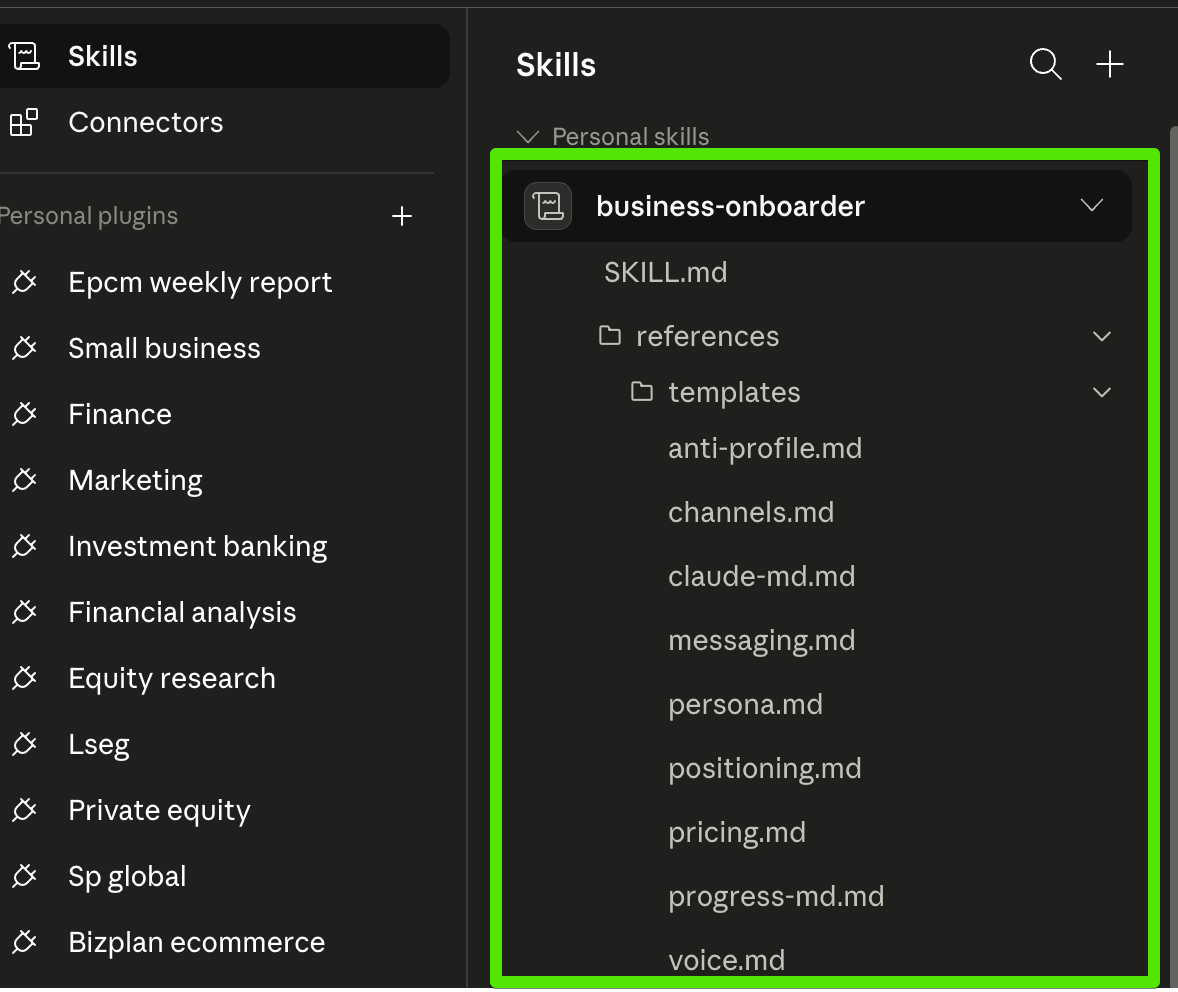
/business-onboarder or by describing what you want.
How to run it
Two paths. Use whichever fits.
Let Claude trigger it automatically. Open a new Cowork task and say something like "I want to set up a foundation for my business — who I serve, how I describe myself, my pricing, my voice." Claude recognizes the match and launches the skill.
Invoke it directly with a slash. Type /business-onboarder in any Cowork task input. The interview starts immediately.
Either way, before any file is written to disk, the skill stops and shows you a summary of what it captured plus what it's about to write. You approve before anything saves.
What to expect during the interview
The interview runs in six phases:
- Welcome and basics — your business name, what you do in two sentences, the kind of business it is, the customer term you use (client, patient, supporter, etc.), and optionally a public URL the skill can read.
- Who you serve — walk through your last five customers, one at a time. What were they trying to get done, how did they want to feel, what were they afraid of, what did they tell other people after you delivered.
- Why you (positioning) — what your customers would do if you didn't exist; what's unique about you; what proof you have; who got the most out of working with you.
- Messaging — the surface problem your customer would Google, the empathy and authority that makes them trust you, the three-step plan they take to work with you, the success and failure pictures.
- Pricing — your actual price card, your pricing history, a deal you lost on price, a deal you closed and regretted not charging more for.
- Anti-profile — who's NOT a fit for you; what early warning signs you missed in past bad relationships; the one question that would tell you "don't take this prospect."
Three things make this different from a generic AI brainstorm:
- The skill quotes you verbatim. Your words go back into the output files as written. It doesn't translate "we help them not feel stupid" into "we provide confidence-building support."
- The skill marks thin evidence honestly. When you can't give a confident answer, it writes
[thin evidence: needs X]and moves on. You fill those gaps later instead of inventing answers under pressure. - The skill applies the Mom Test discipline — it asks about your past behavior, not your opinions or your hypothetical future. "Walk me through the last time…" beats "What would you do if…" every time, and the output reflects that.
The interview will feel less like talking to a chatbot than you might expect. It will feel closer to a thoughtful business advisor who remembers every word you say.
What you get out
When Phase 6 finishes, you get the 9 files generated to a folder of your choice. Each file is print-ready — you can read each one in five minutes and use it immediately. Highlights:
CLAUDE.md— the master file that lives at the root of your workspace folder. The highest-signal summary of your business; Claude reads it (via the Custom Instructions pointer set up in Setting up the Cowork project below) so every future conversation starts with full context.core/persona.md— who you serve, in Jobs-to-Be-Done terms (functional, social, emotional dimensions), with pains and gains for each segment.core/positioning.md— Dunford's five components, a Strategyzer Value Proposition Canvas per segment, and a positioning statement.core/messaging.md— your StoryBrand BrandScript, one-liner, hero copy, and elevator pitch.core/pricing.md— your price card, history, edge cases, and a pricing posture (value-based / cost-plus / market-anchored).core/voice.md— your tone, typography habits, voice principles, non-negotiables, banned words, and sample paragraphs in your actual voice.core/channels.md— your inbound and outbound channels, response-time commitments, channel-specific voice notes.core/anti-profile.md— who you'd refuse, the early warning signs you've learned to spot, and a one-line exit-ramp question.
At the end, Claude delivers a completion-quality summary — a one-page chat output that names every section needing your follow-up before it's publish-ready. "Complete" doesn't mean "every section has rich evidence." It means the skill ran end-to-end. The summary tells you exactly what's solid and what's a draft.
Setting up the Cowork project (do this BEFORE you run the skill)
The Business Onboarder is easiest to use when the project is already in place — that way the 9 files land directly in a folder Claude already has access to. The order matters:
- Create a Cowork Project. In the left sidebar, click Projects → New. Name it something like "My Business — Operations" or "[Company Name] Workspace".
- Attach (or create) a workspace folder. This is where the Onboarder will write its files. Either point the project at an existing folder on your desktop, or create a new one like
~/Documents/yourbusiness-workspace/and attach that. - Set the project's Custom Instructions to this short pointer. Paste verbatim:
"This Project's business context lives in
CLAUDE.mdand thecore/folder of the attached workspace.Read
CLAUDE.mdfirst to orient yourself, then reference the relevantcore/*.mdfile when answering —persona.mdfor who I serve,voice.mdfor how I write,positioning.mdfor why someone chooses me,pricing.mdfor what bends and what doesn't,messaging.mdfor our standard scripts,channels.mdfor where customers reach us,anti-profile.mdfor who isn't a fit.Match my voice, respect my anti-profile, and use my actual pricing. Don't invent business details — if something isn't in the files, ask before assuming."
That's all the Custom Instructions field needs. The pointer tells Claude where to look; the files themselves do the heavy lifting.
- Open a task inside the project and run the Onboarder. The 9 files land in your attached folder automatically —
CLAUDE.mdandprogress.mdat root, the seven dimension files incore/. Claude already has access because you attached the folder in step 2.
Every conversation you start inside that project will now inherit your full business context. Ask it to draft a follow-up email — it lands in your voice. Ask it to qualify a lead — it checks against your anti-profile first. Ask it to write a landing page — it uses your BrandScript and your messaging hierarchy.
That's the unlock.
What's next
Module 6 closes the course with the framework that decides when not to run any of this. Some of what we've covered is the right answer for your business; some of it isn't. The Build / Buy / Skip discipline is how you tell.
If you've already run the Onboarder, the next move is small: start one Cowork project, attach the workspace folder where your files live, paste the Custom Instructions pointer from earlier in this module, and try one of the five workflows from Module 4 in that project. You'll see the difference between "Cowork producing generic output" and "Cowork producing output that actually sounds like your business."